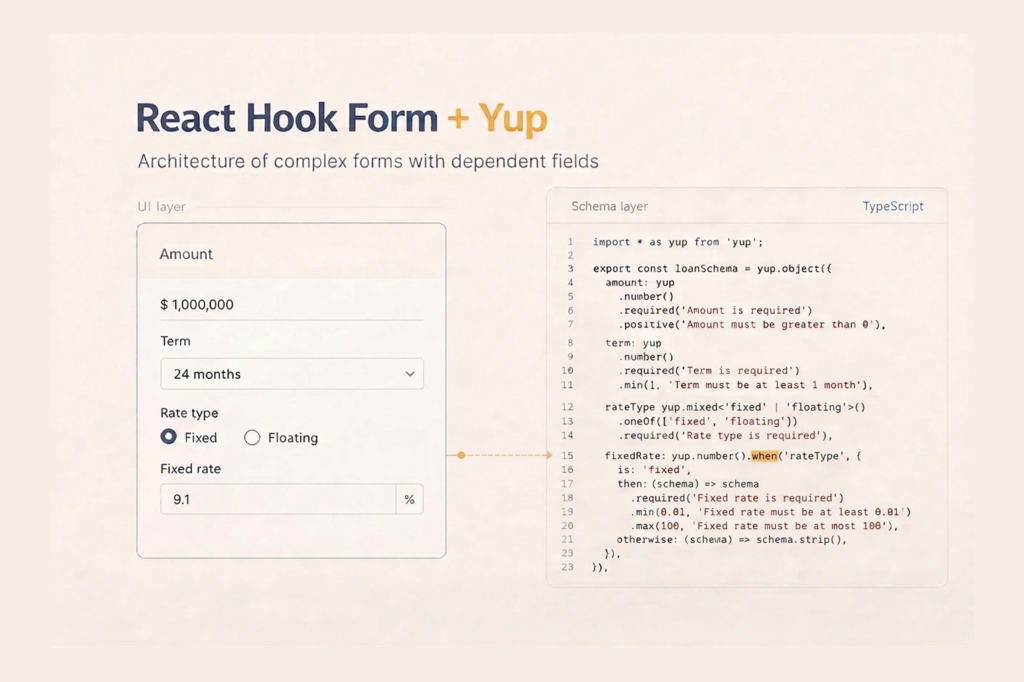
React Hook Form + Yup in Production: Architecting Complex Forms
A loan application form may look simple at first glance: amount, term, rate. But once you add multiple modes, collateral, co-borrowers, and realtime feedback, the problem is no longer validating individual fields. The real challenge becomes keeping the whole system manageable as requirements grow.
In this article, we will break down how to design a form architecture that will not need to be rewritten in six months. Using a real loan form as an example, we will cover dependent fields, conditional schemas, array validation with uniqueness checks, async validation, and rerender control.
When This Stack Makes Sense
The main criterion is not the number of fields, but whether changes have become non-local. If modifying one place requires updates in three others, the form has already outgrown useState.
Typical signs that it is time to move on:
- fields depend on each other: selecting a mode changes validation rules for other fields
- both create and edit modes exist, and dirty/touched must be handled correctly
- there are arrays of objects: lists of collateral, co-borrowers, documents
- the form is composed of nested components and reusable fields
- there are server errors for specific fields and a root-level error
If there are many fields but they are independent, RHF may be unnecessary complexity. If there are relationships and branching logic, RHF simplifies subscription management, and Yup provides a single place for business rules and normalization.
Before and After
The loan form started as a linear list of fields inside a single component. State was stored in useState, validation was done manually on submit, and conditional fields were implemented with ternaries directly in JSX. That worked for the first twenty fields. When collateral was added, an array of objects with its own rules, and later a co-borrower section, the component started to grow, and validation logic began to duplicate.
Before:
LoanForm.tsx

400+ lines
useState for every field
manual validation in onSubmit
conditional fields via state flags
data transformation right before fetch
After:
features/loan/
loan.schema.ts // rules and normalization
loan.mappers.ts // DTO <-> Form
useLoanForm.ts // lifecycle and submit
LoanForm.tsx // UI composition
CollateralFields.tsx
CoBorrowerFields.tsx
Each layer solves one problem. The schema knows nothing about components. The mapper knows nothing about validation. The hook knows nothing about layout. That boundary does not need to be reconsidered when adding a new form section.
Dependent Fields and Conditional Sections: Where Rules Belong
In the loan form, the classic case is rateType switching the mode and changing requirements for fixedRate. The same applies to checkboxes that enable sections. The key principle is that conditional logic should live in one place, preferably in the schema, not in JSX or submit handlers.
Minimal example with numeric normalization and when():
import * as yup from "yup";

// <input type="number"> returns an empty string "" when empty.
// Without transform, Yup receives a string where it expects a number,
// and required() behaves unexpectedly.
const numericField = () =>
  yup
    .number()
    .transform((value, originalValue) => (originalValue === "" ? undefined : value))
    .typeError("Enter a number");

export const loanSchema = yup.object({
  rateType: yup.string().oneOf(["fixed", "floating"]).required(),

  fixedRate: numericField().when("rateType", {
    is: "fixed",
    then: (s) => s.required("Enter rate").min(0).max(100),
    otherwise: (s) => s.strip(),
  }),

  hasCollateral: yup.boolean().default(false),

  collateral: yup
    .array()
    .of(
      yup.object({
        type: yup.string().required(),
        value: numericField().required().min(0),
      })
    )
    .when("hasCollateral", {
      is: true,
      then: (s) => s.min(1, "Add at least one collateral item").required(),
      otherwise: (s) => s.strip(),
    }),
});
numericField() is reused for all numeric fields in the form: principal, termMonths, fixedRate, collateral[].value. Normalization is defined once.
Three layers, three responsibilities:
- strip() removes a field from the validated schema output. It works only if you use resolver output. With raw: true in @hookform/resolvers, the schema returns raw values and strip() is not applied.
- unregister and shouldUnregister control what RHF stores: touched, dirty, errors, and participation in validation.
- the mapper before submission is the final guarantee: a hidden field must not reach the API even if UI logic fails.
In the loan form, we relied on the mapper as the last line of defense. strip() was convenient but not the only cleanup mechanism.
Numeric Fields and Empty Inputs
A common RHF + Yup pitfall: <input type=”number”> returns “” when empty. Yup receives a string instead of a number, and required() behaves unexpectedly. That is why normalization should be centralized in numericField(), while the schema defines only constraints.
About money: multiplying and dividing by 100 on number can cause rounding issues. For financial values, use Math.round() in the mapper or a decimal library if precision is critical.
Large Numbers: When number Is Not Enough
Keep in mind the JavaScript limit:
Number.MAX_SAFE_INTEGER // 2^53 - 1If values can exceed this limit, for example large financial amounts or calculations in minimal units, using number may lead to precision loss.
In one production project, we intentionally avoided both number and BigInt and stored numeric values in the form as strings.
const amountSchema = yup
  .string()
  .matches(/^\d+$/, "Enter a valid number")
  .required();
Why strings:
- no precision loss
- BigInt cannot be serialized to JSON directly
- the server accepted values as strings
- all arithmetic was handled on the backend
In this approach, it is important to separate:
- storage format in the form, string
- format validation, regex or schema
- arithmetic, on the server or in a dedicated service
If the form does not perform calculations on the client, storing numeric values as strings is a simple and safe way to avoid precision issues.
Array and Object Validation: Uniqueness in Lists
Collateral in the loan form is an array of objects: type and estimated value. Yup allows describing each item with .of(), and this works correctly with useFieldArray.
Uniqueness is more complex. In our case, collateral types must not repeat. Yup does not provide built-in uniqueness validation for arrays, but it can be implemented with .test():
collateral: yup.array()
  .of(collateralItemSchema)
  .test(
    "unique-types",
    "Collateral types must be unique",
    (items) => {
      if (!items) return true;
      const types = items.map((i) => i.type).filter(Boolean);
      return types.length === new Set(types).size;
    }
  )
  .when("hasCollateral", {
    is: true,
    then: (s) => s.min(1, "Add at least one collateral item").required(),
    otherwise: (s) => s.strip(),
  }),
.test() at the array level produces a single error message for the entire array. If you need to highlight specific rows, you must return a ValidationError with a path via createError or implement the check at the UI level. In our case, one message was sufficient.
Async Validation
Realtime validation in the loan form often depends on the server, for example checking whether the requested amount exceeds the user’s available limit.
Yup supports async in .test(), but network validation has two risks:
- with mode: “onChange”, a request may be triggered on every keystroke, so blur or debounce is needed
- Yup does not cancel previous calls, which can cause race conditions
For critical cases, manage request cancellation in a custom hook or service using AbortController. Typically, the schema remains synchronous, and network validation is moved to a separate hook that calls setError when needed.
DTO vs Form: Mapping as an Architectural Invariant
FormValues represents what the user enters. API DTO is the server contract. They must differ, otherwise constraints from one layer leak into another.
In the loan form, differences included: amounts stored in cents on the server but displayed in currency units; hasCollateral existing only in the form; field names differing between snake_case and camelCase.
export function mapFormToApi(values: LoanFormValues): SubmitLoanRequest {
  return {
    principal_amount: Math.round(values.principal * 100),
    term_months: values.termMonths,
    rate_type: values.rateType,
    fixed_rate: values.rateType === "fixed" ? values.fixedRate : null,
    collateral_items: values.hasCollateral
      ? (values.collateral ?? []).map((i) => ({
          collateral_type: i.type,
          estimated_value: Math.round(i.value * 100),
        }))
      : [],
  };
}
The mapper is the final gate before the API. Even if strip() fails or unregister behaves unexpectedly, the mapper explicitly controls the final payload. Mapper tests are just as important as schema tests. This is where money, null cases, and array transformations live.
Edit Mode and reset
The loan form supported two modes: creating a new request and editing a draft. reset() with a prepared values object is the correct choice. It synchronizes values, defaultValues, and dirty/touched state at once. If you use setValue() field by field, isDirty may be calculated incorrectly.
One nuance: if initialData is recreated by the parent on every render, reset will run infinitely. initialData must be referentially stable via useMemo in the parent component.
Performance: Where Rerenders Happen
In a large form with branching logic, it is easy to accidentally cause one field change to rerender the entire tree.
watch() without arguments subscribes to the whole form. If called in the root component, any change rerenders everything. useWatch() allows you to move the subscription down to the component that needs it and localize rerenders. Prefer useWatch() for specific dependencies.
Passing the entire formState object as a prop disables subscription optimization. RHF tracks which properties are actually read and subscribes only to those. Passing the whole object breaks that optimization. Destructure only the fields you need before rendering.
For isolating subscriptions in deeply nested components, use useFormState:
// Subscribes only to errors.collateral
const { errors } = useFormState({ control, name: "collateral" });
To read values once without creating a subscription, use getValues() inside event handlers.
Gotchas
| Problem | Consequence | Solution |
|---|---|---|
| <button> without type=”button” | Form submits when clicking a delete button | Always set type=”button” |
| append({}) | dirty/touched bugs on first submit | Pass an object with defaults for all fields |
| index as key in useFieldArray | Losing focus and values when removing from the middle | Use field.id only |
| watch() without arguments in root | Full tree rerender on any change | useWatch() or getValues() |
| Passing entire formState as prop | Unnecessary rerenders, optimization disabled | Destructure needed fields |
| boolean().required() | Form passes validation with false | For required consent use .oneOf([true]) |
| setValue() instead of reset() in edit mode | isDirty calculated incorrectly | reset(mapApiToForm(data)) |
| keyof instead of Path for server errors | No path validation, easy to assign error incorrectly | Use Path<LoanFormValues> from react-hook-form |
| 100 / / 100 on number | Rounding errors in financial data | Use Math.round() or a decimal library |
| Unstable initialData in useEffect | Infinite reset calls | Use useMemo in parent |
| Async .test() without debounce | Request on every keystroke with mode: “onChange” | Use mode: “onBlur” for async validation |
| raw: true in resolver | strip() not applied, fields reach payload | Keep raw: false or clean in mapper |
Conclusion
The schema / mappers / hook / UI architecture keeps the form manageable as requirements grow. The schema is tested in isolation, the mapper protects the API from garbage, and the hook isolates logic from rendering. Each new section is added in a predictable place without affecting neighbors. When a hook starts absorbing unrelated domain logic, it is time to split it.
If you are starting a new project, consider Zod, Valibot, or ArkType. The @hookform/resolvers ecosystem supports all three, and TypeScript inference is more predictable there than in complex Yup when() and strip() constructions.