The redesign is done. The website looks good: more modern, cleaner, and more polished than before.
But a month later, it turns out that inquiries have not increased. SEO traffic has dropped. The form on the homepage works, but some requests seem to disappear. Pages that used to bring traffic from search are suddenly gone.
This is what can happen when a redesign starts with visuals, not with a review of the site’s real problems.
That is why two website redesign estimates can differ by several times.
One estimate may only include updating the design of several pages. Another may include an audit, structure, UX, development, and a dozen more stages that affect the result.
Formally, both teams are offering a “website redesign”.
In practice, they may be talking about completely different scopes of work, different risks, and different outcomes.
The most expensive redesign is not the one with the most screens. It is the one after which you have to recover lost traffic, fix forms, and explain services all over again — even though they should have been clear from the start.
Visual refresh, redesign, or deeper rebuild: how to understand the scope
The word “redesign” can mean different things.
Sometimes it is a light visual refresh. Sometimes it is a full rework of the structure and UX. And sometimes it is almost a new website, because the old technical foundation is already holding the project back.
That is why it is important to understand the scope before estimating the project.
Visual refresh
A visual refresh is suitable when the website generally works well: the structure is clear, inquiries come in, the content is relevant, and the CMS works for the team, but the site looks outdated.
In this case, you can update colors, typography, individual blocks, and visual presentation without significantly changing the site’s logic.
A visual refresh is usually enough if:
- the website already brings inquiries;
- the structure is clear to users;
- the content is generally up to date;
- the team is comfortable using the CMS;
- the main issue is outdated visual presentation.
Full redesign
A full redesign is needed when the problem is not only how the website looks.
Here, the team reviews page structure, user flows to the inquiry, CTAs, forms, the mobile version, and how information is presented. The goal is not just to make the website look better, but to understand what prevents it from being clear and convincing.
You most likely need a full redesign if:
- users get lost in the sections;
- services are difficult to understand;
- the mobile version is inconvenient;
- forms exist, but the number of inquiries could be higher;
- the website looks weaker than the company itself;
- important pages do not help users make a decision.
Deeper website rebuild
A deeper rebuild is needed when not only the design is outdated, but the foundation of the project as well.
For example, the CMS is inconvenient, the structure is difficult to scale, forms are not connected to the CRM, the content no longer reflects the services, old pages are important for SEO, and any change requires too much manual work.
A deeper rebuild is necessary if:
- the website is difficult to update;
- the CMS limits further development;
- forms are not connected to the CRM;
- the structure no longer reflects the business;
- old pages are important for SEO, but need to be changed;
- adding new sections is painful;
- the website does not support current sales and processes.
This does not replace an audit, but it helps clarify the main point: “redesign” can mean different scopes of work. A proper estimate starts not with the number of pages, but with understanding what problem needs to be solved.
Why a redesign cannot be estimated only by the number of pages
“We only have 7 pages” does not always mean the project will be simple.
Two companies can come with the same number of pages, but with completely different complexity inside.
In one case, it may be a standard corporate website: homepage, services, about the company, contacts, and several text-based sections. That kind of project can usually move faster.
In another case, behind the same number of pages there may be inquiry forms, filters, CRM integrations, a personal account, multilingual functionality, SEO pages, dynamic content, and different scenarios for different user groups.
That is why the phrase “we only have one page” does not always make things simpler. If that page includes filters, forms, integrations, and data transfer logic, it may require more work than five standard information pages.
In the mockup, it may look like one neat block. In development, there may be a whole chain behind it: where the request goes, what data is sent, who receives a notification, how the inquiry source is recorded, and what happens if the submission fails.
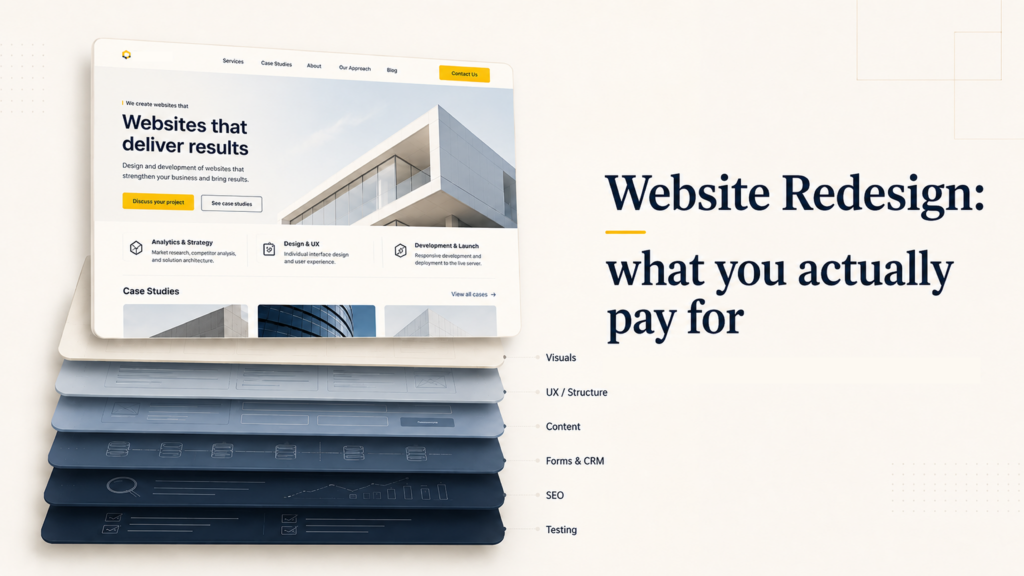
That is why the number of pages alone does not show the real complexity of a project. The estimate depends not only on the size of the website, but on what happens inside it: structure, forms, integrations, content, mobile version, SEO, and testing.
Website structure
The more complex the section logic, the more work is needed before design.
Unique templates
Repeated pages are faster to build; unique ones require separate work.
Forms and inquiries
It is important to think through not only the look, but also the data flow.
CRM and integrations
Connection with external systems adds technical complexity.
Mobile version
Responsive design should be checked as a separate user scenario.
Content
Old texts often need to be updated for the new structure.
SEO migration
It is important not to lose pages that already bring traffic.
Testing
Before launch, forms, speed, analytics, and integrations need to be checked.
What is usually revealed before design starts
A redesign often starts with the phrase “we need to update the website”.
But behind that request, there may be very different problems: outdated structure, irrelevant content, a weak path to inquiry, an inconvenient mobile version, CMS limitations, or the risk of losing search traffic.
From the outside, all of this may sound like “we want to refresh the website”. In reality, the task is no longer about a new look. It is about removing the points where the website loses attention, trust, or inquiries.
What it sounds like at first
We want to refresh the website
What may be hidden inside
- outdated structure;
- weak path to inquiry;
- irrelevant content;
- form issues;
- risk of losing SEO;
- inconvenient CMS;
- no CRM connection;
- weak mobile version.
What is actually included in the cost of a redesign
When a client sees an estimate, it may seem like they are paying for a set of design mockups.
In practice, the cost of a redesign includes work that is not always visible in the final picture, but directly affects the result: whether traffic is preserved, whether inquiries reach the team, whether the website will be easy to develop after launch, and whether everything will need to be fixed again a month later.
Current website audit
Before making changes, it is important to understand what exactly is not working: where users get lost, which pages are outdated, how forms behave, what happens on mobile, and which pages already bring SEO traffic. Without an audit, the website can look fresher while keeping the same internal problems.
Structure and scenarios
A redesign should help users understand the offer faster and get to the right action. That is why, before design, the structure needs to be rebuilt: which sections are needed, what should be on the homepage, where to explain services, where to show cases, where to place the form, and how to guide a person toward an inquiry.
Prototypes
Prototypes help check the logic of pages before visual design. At this stage, it becomes clear whether a page is overloaded, whether accents are placed correctly, and whether users get answers to their key questions before sending an inquiry.
UI design
Design makes a website not only modern, but also clear and convincing. It guides attention, removes visual noise, helps users quickly understand what matters, and brings the website’s visual level in line with the real level of the company.
Development and integrations
After design, the website needs to be technically built: pages, CMS, forms, responsive layouts, speed, analytics, and integrations. The same form can simply send an email, or it can pass data to a CRM, record the inquiry source, and trigger notifications for the manager.
Content
Old texts often no longer fit the new structure. If the company has changed its services, positioning, or audience, content should not just be moved — it should be updated so that it clearly explains the value and helps users make a decision.
SEO migration and testing
If the website already gets search traffic, it is important not to lose working pages, URLs, metadata, and structure during the redesign. Before launch, forms, the mobile version, speed, analytics, integrations, and key user scenarios also need to be checked. Some errors cannot be seen in the mockup — they only appear when the website starts working for real.
Where a cheap redesign becomes expensive
A cheap redesign is not dangerous because it looks simpler.
The main risk is that some important work simply does not make it into the project. These problems are rarely visible during the design presentation. They appear later, when the website is already supposed to bring results.
That is why a cheap redesign sometimes becomes expensive not on the day you pay for it, but a month after launch — when it becomes clear that the website looks better, but the business problem is still there.
Cutting costs at the start often shows up after launch
SEO was not considered
Organic traffic may drop.
Forms were not checked
Some inquiries may be lost.
Mobile was not thought through
Users leave from their phones.
Structure was not rebuilt
The website looks better, but the problem remains.
What a proper redesign process looks like
A good redesign does not start with choosing a visual style.
First, you need to understand what the website should do for the business and what is currently preventing it from doing that. Only then does it make sense to move on to structure, prototypes, visual concept, development, and launch.
Redesign process
Understand the task
Rebuild the structure
Prepare prototypes and design
Implement the technical part
Check before and after release
This way, a redesign becomes not a chaotic visual update, but a consistent process: first understand the problem, then design the solution, and only then carefully move it into design, development, and launch.
How to understand what you are paying for
If two redesign estimates differ by several times, you should not automatically choose the cheaper or the more expensive one.
First, you need to understand what is being compared.
One team may be estimating only the visual update of several pages. Another may be estimating an audit, structure, UX, prototypes, design, development, content, SEO migration, forms, integrations, and testing.
Formally, both can be called a “website redesign”. But inside, there will be a different scope of work and a different level of responsibility for the result.
Before choosing a contractor, it is worth clarifying:
- what exactly is included in the project;
- whether there will be an audit of the current website;
- who is responsible for structure and UX;
- whether the mobile version is included;
- what will happen to the content;
- how SEO traffic will be preserved;
- who will set up forms and integrations;
- how testing is handled;
- what happens after launch.
Sometimes a cheaper estimate really does fit the task. For example, if the website only needs a light visual refresh.
But if the project includes a new structure, forms, integrations, content migration, SEO, and development, comparing that work with a simple “design update” is not correct.
It is no longer a question of “who will draw the mockups cheaper”.
It is a question of who will help identify the real problem of the website and carefully bring the changes to launch.
Not sure whether your website needs a redesign?
You can start with an audit. We will look at where the website loses users, trust, or inquiries, and show what is actually worth changing: visuals, structure, content, technical foundation, or the entire path to inquiry.