In the previous article, we looked at how elements of Extreme Programming help manage code quality and the development process. We needed not just a new process, but something like an immune system: a mechanism that does not treat problems after the fact, but recognizes threats in advance and develops “antibodies” against them. Extreme Programming (XP) practices became that system for us.
This time, we will talk about another situation: when a Scrum team works in sprints, but urgent bugs come in during the process, priorities change, and ad-hoc tasks appear. Sometimes they cannot be postponed until the next sprint. But if they are added on top of what has already been planned, the team quickly loses focus, achieving the sprint goal is put at risk, and the workload stops being transparent.
And this is exactly where Kanban helps strengthen Scrum: maintain the work rhythm, manage the flow of tasks, and respond faster to urgent changes.
We will look at what Scrum and Kanban have in common, how Kanban can be used inside the Scrum framework, and what problems this solves in practice.
Briefly about Scrum
Scrum is an approach to organizing work in short iterations, or sprints.
A Scrum Team has three main roles:
- Product Owner;
- Scrum Master;
- Developers.
At the beginning of the sprint, the team plans the work (Sprint Planning), synchronizes every day during the Daily Scrum, and at the end holds the Sprint Review and Sprint Retrospective.
The main idea of Scrum is to work in a stable rhythm and regularly deliver a finished result.
Read more about Scrum in the Scrum Guide.
Briefly about Kanban
Kanban is a method that helps manage the flow of tasks.
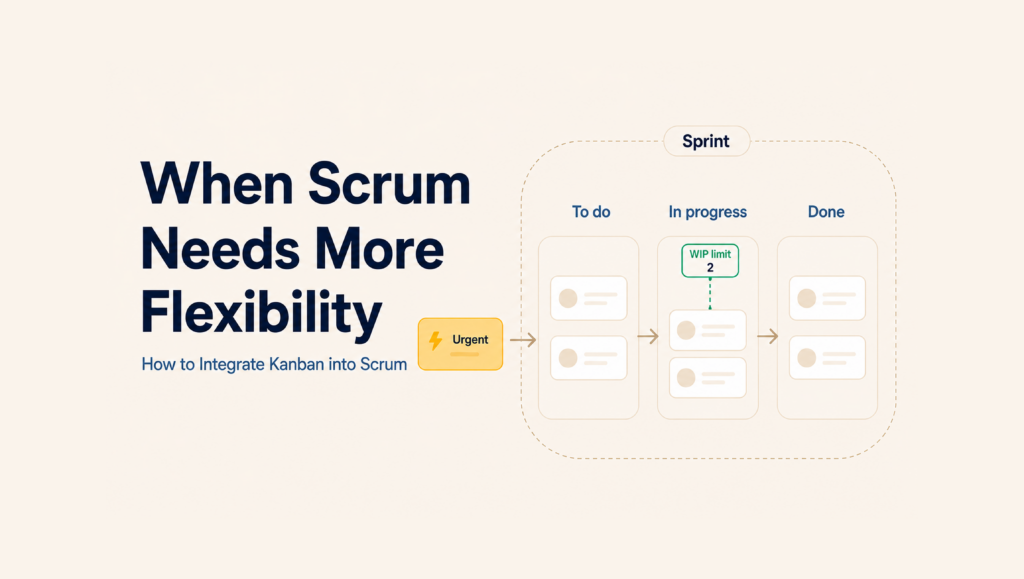
Work is displayed on a board, where each column corresponds to a stage of the process: for example, To Do, In Progress, Testing, and Done.
WIP limits (Work In Progress) are set for each stage – a limit on the number of tasks that can be worked on at the same time.
The main idea of Kanban is simple: first finish what has been started, then take on something new. Read more about Kanban in the Kanban Guide.
What Scrum and Kanban have in common
Despite the differences, Scrum and Kanban pursue the same goals.
Both approaches help:
- make work transparent;
- notice problems faster;
- receive feedback;
- improve the process;
- adapt to changes.
Scrum sets the rhythm of work, while Kanban helps manage the flow of tasks within that rhythm.
Implementing Kanban in Scrum
Kanban in Scrum is not a replacement for the Scrum framework, but a way to make it more flexible.
You can read the official recommendations from Scrum.org on how to properly integrate Kanban into Scrum here, and below we will explain how we did it.
How Kanban works in Scrum in practice
Scrum keeps the foundation of the process, while Kanban adds flow transparency and workload control.
What remains from Scrum
- roles in the team;
- sprints;
- Sprint Planning;
- Daily Scrum;
- Sprint Review;
- Sprint Retrospective.
What is added from Kanban
- Kanban board;
- WIP limits;
- pull-based work model;
- flow metrics: lead time, cycle time, throughput.
Roles and events
We keep the Scrum roles and events – sprints, planning, daily meetings, review, and retrospective – but supplement the process with Kanban tools.
Kanban board
We use a board with columns that reflect the stages of the workflow, for example: To Do, In Progress, Testing (can be additionally detailed into testing performed in different environments), Ready for Production, Done. This gives full visibility into the status of all tasks at any point in time.
WIP limits
For each column, we set the maximum number of tasks that can be worked on at the same time. This prevents team overload, helps finish started work before taking on new work, and also makes it possible to see “bottlenecks” at each stage of work.
Pull system
The team takes tasks into work as free capacity appears. The main part of the tasks consists of fixed Sprint Backlog items, and the remaining part consists of ad-hoc tasks.
Flow metrics
During retrospectives, we analyze the average task completion time (lead time), the average active work time on a task (cycle time), and throughput, and also compare the cumulative flow diagram with the burndown chart. This helps identify bottlenecks and improve the process.
Thus, Scrum sets the rhythm of work, while Kanban helps manage the flow of tasks within that rhythm.
How it works
The team continues to work in sprints, but tasks move through a visual flow.
New tasks are taken only when free capacity appears in the process. This reduces multitasking and helps finish started work faster.
Practical case from HR-tech
On one of our HR-tech projects, the team simultaneously:
- worked on new functionality;
- supported an already working product;
- fixed urgent bugs in production/performed other ad-hoc tasks.
If we followed only Scrum, urgent tasks could disrupt the sprint plan or critical fixes would have to be postponed until the next sprint.
The solution was to integrate Kanban into the Scrum process, in which we defined the mandatory amount of work for the sprint, while at the same time leaving a “flexible” part for maneuver.
In practice, it looked like this: with an average velocity of 30 SP per sprint, we took 20–25 SP into work during planning.
The remaining reserve was left for critical tasks from production and ad-hoc tasks. This made it possible not to overload the sprint and not to disrupt it during sudden incidents, while preserving the ability to quickly pick up urgent tasks without waiting for the next planning session.
The team continued to work in sprints: held planning, daily meetings, reviews, and retrospectives, while the entire backlog was managed on a Kanban board, and we set WIP limits for the In Progress and Testing columns.
When an unplanned task appeared, and the variable part of our Velocity had not yet been used up, the team could start working on the task. This made it possible to respond quickly to changes without overloading the team and without disrupting the sprint.
As a result:
- urgent tasks went into work immediately;
- the team kept focus on the sprint tasks;
- the workload remained transparent;
- bottlenecks were clearly visible.
In summary: what does Kanban in Scrum provide?
Flexibility without losing predictability
The team keeps the sprint rhythm, but can quickly take on urgent tasks.
Workload control
WIP limits help avoid overload and show the team’s real capacity.
Fast problem detection
The board makes blockers and stuck tasks visible immediately.
Process improvement based on data
Flow metrics help plan more accurately and find bottlenecks.
Thus, the combination of structured Scrum planning and Kanban flexibility makes it possible to work according to iteration plans and, at the same time, take unplanned/one-time requests that require immediate resolution into work.
Conclusion
Kanban in Scrum is a way to strengthen the Scrum framework through task flow visualization and workload control.
Scrum keeps a clear work rhythm, while Kanban helps respond faster to changes and manage tasks within the sprint more effectively.
If a team needs to develop new functionality and quickly solve urgent problems at the same time, Kanban in Scrum can also become a convenient and practical solution.